Introduction
This serves as a breakdown of this multiplayer template used for a Godot 4.6 project to quickly crash course Godot P2P ENet multiplayer. The template consists of the following features:
- A lobby menu where a LAN player can host
- A player controller
- An inventory
- And a global chat interface
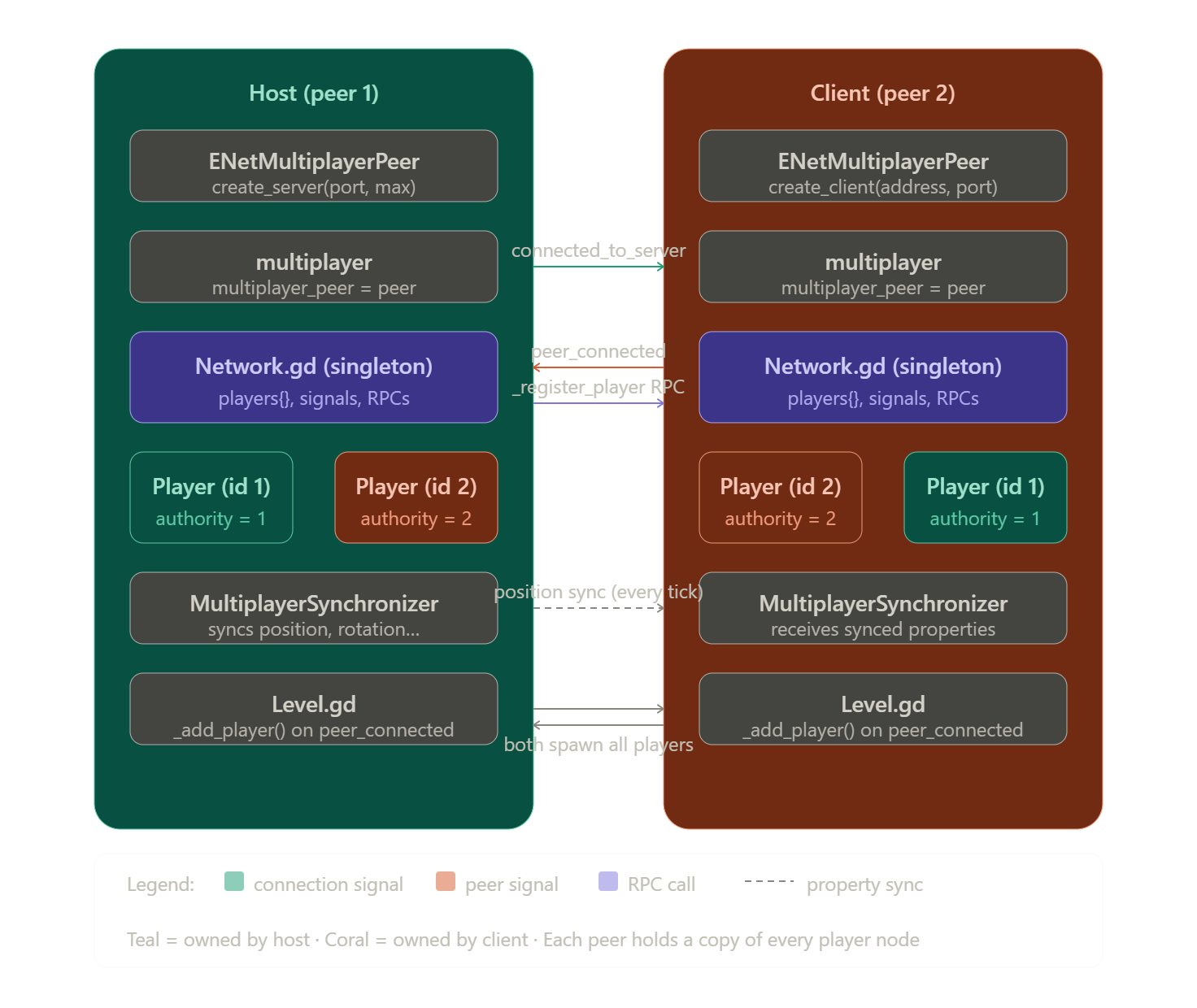
Notably, we’re concerned about the networking part of this project such as establishing a connection, replicating player positions on each client, and determining multiplayer authority. The following diagram breaks the project down in slightly more detail, but most of our networking components logic is in:
- The player controller
player.gd- In this case, the script is not just a player controller but a general representation of the client/peer, so it also has some multiplayer logic like chat or setting player skin
- The
network.gdsingleton - The
inventory.gd - The
level.gdwhich contains some chat logic
---
title: Project Structure
---
flowchart LR
	Globals((GLOBAL
	Item Database))
	Globals2((GLOBAL
	Network))
    Level.tscn(Level.tscn
    Main Scene) --> UI
    Level.tscn --> PlayersContainer
    Level.tscn --> level(Static Level
    i.e. Floor, Lighting)
    UI --> Inventory
    UI --> Chat
    UI --> main(Main Menu)
    PlayersContainer --> player1(Player Instance 1)
    PlayersContainer --> player2(Player Instance n...)
    player1 --> Collision
    player1 --> SpringArm
    player1 --> PlayerLabel
    player1 --> 3DRobot
    player1 --> MultiplayerSynchronizer
    3DRobot --> Skeleton
    3DRobot --> tree(AnimationPlayer
	& AnimationTree)

    style Inventory fill:#FFA500
    style UI fill:#FFA500
    style Chat fill:#FFA500
    style main fill:#FFA500
    style Globals fill:#ADD8E6
    style Globals2 fill:#ADD8E6
    style Level.tscn fill:#ADD8E6
    style level fill:#C4A484
Not-So-Glossary
Here are some common Godot networking terms we’ll see. Review them briefly, and then come back regularly.
ENetMultiplayerPeer- Each person is a “peer” and needs to create this object for themselves, whether you are a host or a connecting player. This will be provided to the
MultiplayerAPI.
- Each person is a “peer” and needs to create this object for themselves, whether you are a host or a connecting player. This will be provided to the
MultiplayerAPI- This global per-client object can easily be accessed with the
multiplayerkeyword. Notably it emits connection signals that let us specify what to do when a player joins, leaves, or fails to join.
- This global per-client object can easily be accessed with the
MultiplayerSpawnerNode- Watches an assigned path for any spawns/respawns. If any node is added to (or removed from) that path, it will be replicated across every peer even if it’s mid-game. For example,
"PlayerCollection"will contain a"PlayerSpawner"node that watches"PlayerCollection"for any additional players, and replicate accordingly.
- Watches an assigned path for any spawns/respawns. If any node is added to (or removed from) that path, it will be replicated across every peer even if it’s mid-game. For example,
MultiplayerSynchronizerNode- A node that continuously broadcasts specified properties (position, rotation, health, etc.) from the authority peer to everyone else.
- RPC (Remote Procedure Call)
- Defining
- Annotate a function with
@rpc(...)to turn it into one. It is sort of the opposite ofMultiplayerSynchronizerin that it’s more of a one-time event like picking up an item or shooting a bullet.
- Annotate a function with
- Calling
- Invoke
.rpc(...)on the@rpcfunction to execute it against everyone. - Invoke
.rpc_id(...)on the@rpcfunction execute it against someone specific.
- Invoke
- Defining
- Authority
- Every node has a peer that “owns” it as the authority, which by default is the host. Only the peer with authority can make changes to that node. The most basic example is to have each peer be the authority of their respective player.
- You can call the following on a node:
is_multiplayer_authority() -> boolget_multiplayer_authority() -> intset_multiplayer_authority() -> void
- Peer ID
- A unique ID assigned to each peer, the host is always
1. You can see the current peer’s ID viamultiplayer.get_unique_id()or just usemultiplayer.is_server()to test if you are the server.
- A unique ID assigned to each peer, the host is always
The Network singleton
This is the central nervous system of our networking, persisting throughout every scene and accessible anywhere. It initializes our connections, lets us specify what to do during events like player joining, and lets us maintains a registry of the players and their data.
It lets us do these three main things:
Connection management - It’s the only place that really touches ENetMultiplayerPeer. It’s where can best define and implement a start_host and join_game function for when we press a button in the UI.
Signal hub - The MultiplayerAPI has five built-in signals we can catch, handle, and possibly re-emit if we want to send it to other parts of the code with greater detail.
| Signal | Fires on | Meaning |
|---|---|---|
connected_to_server | Client only | I successfully joined :D |
connection_failed | Client only | I failed to join :( |
peer_connected | Everyone | Someone successfully joined |
peer_disconnected | Everyone | Someone left |
server_disconnected | Clients only | Host died |
Player registry - It’s a common and useful practice to keep a players dictionary with the peer ID as the retrieval key. It can store anything, like player name, their score, etc.
Walk through the process
This is the general architecture for a 2-player (or more) setup.
Phase 1 - Establishing Connection
First we need to establish the connection.
- Each peer creates a new
ENetMultiplayerPeerwhich we’ll callpeer. - Each peer calls either
create_server(...)orcreate_client(...)depending on their role. - Each peer tells
MultiplayerAPIwho they are viamultiplayer.multiplayer_peer = peer.
Phase 2 - Peer Discovery & Spawning
Great, Godot networking is now live. Now we need to hook into the five MultiplayerAPI signals so that we do something useful when they start firing. Let’s work on connected_to_server, for example.
| Explanation | Code | File |
|---|---|---|
| Define your handler | _on_connected | network.gd |
| Hook it into MultiplayerAPI | multiplayer.connected_to_server.connect(_on_connected) | network.gd |
| We’ll populate the player registry for convenience | players[peer_id] = player_info | network.gd |
| Define a new signal so we can send it to other parts of code | signal player_connected(peer_id, player_info) | network.gd |
| Re-emit the signal | player_connected.emit(...) | network.gd |
| Define your handler | _on_player_connected | level.gd |
| Physically instantiate the player into the level as needed | player_scene.instantiate(), player.set_player_skin(skin_enum),player.nickname.text = nick | level.gd |
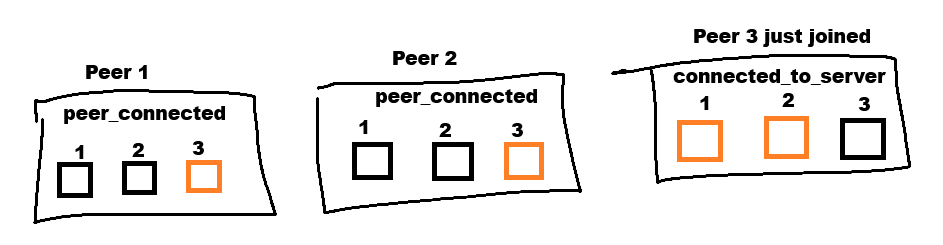
All of that is a long winded way of saying we turned the signal of “I just connected!” into actually instantiating the player node in the scene of the client that just connected. This process can generally be repeated any of the other five signals from MultiplayerAPI, such as
peer_connectedwhere rather than instantiating yourself, you are instantiating other players that join.
Phase 3 - Synchronizing State
Now that we’ve initialized everything, we can focus on the actual game. This is where we need to start asking ourselves certain questions like,
- What do we want to synchronize?
- When and how often do we synchronize?
Option A: MultiplayerSynchronizer
In simple terms, a MultiplayerSynchronizer is a node that takes the path of a “container” node and watches it to see if anything spawns in or out of it. If
There are two main benefits to this:
- It supports mid-game spawns and despawns
- Reduces overhead of maintaining two
Walk through a real example
We’re going to do the exact same thing as above, but referencing the code in the template.
Phase 1
Phase 2 - Peer Discovery & Spawning
This is all of the code needed to implement spawning players into the level when they join the game. The one exception is the host themself who is specially handled in the start_host function, but it just ends up emitting a signal in the same fashion as what you see here.
Network.gd
# Define a signal for level.gd to hook into
signal player_connected(peer_id, player_info)

# Hook into the signals provided by Multiplayer API
func _ready() -> void:
	multiplayer.connected_to_server.connect(_on_connected_ok) # You joined
	multiplayer.peer_connected.connect(_on_player_connected) # Someone else joined

# Handle what to do when you join
func _on_connected_ok():
	var peer_id = multiplayer.get_unique_id()
	players[peer_id] = player_info

	# This tells level.gd "hey, I need you to instantiate a player with this info"
	player_connected.emit(peer_id, player_info)

# Handle what to do when someone else joins
func _on_player_connected(id):
	if DisplayServer.get_name() == "headless":
		return
	_register_player.rpc_id(id, player_info)

@rpc("any_peer", "reliable")
func _register_player(new_player_info):
	var new_player_id = multiplayer.get_remote_sender_id()
	players[new_player_id] = new_player_info
	player_connected.emit(new_player_id, new_player_info)
Level.gd
func _ready() -> void:
	Network.connect("player_connected", Callable(self, "_on_player_connected"))

func _on_player_connected(peer_id, player_info):
	_add_player(peer_id, player_info)

func _add_player(id: int, player_info : Dictionary):
	if DisplayServer.get_name() == "headless" and id == 1:
		return

	if players_container.has_node(str(id)):
		return

	var player = player_scene.instantiate()
	player.name = str(id)
	player.position = get_spawn_point()
	players_container.add_child(player, true)

	var nick = Network.players[id]["nick"]
	player.nickname.text = nick

	var skin_enum = player_info["skin"]
	player.set_player_skin(skin_enum)